
Leeef Reader
Zhengzhou Binggui Network Technology Co., Ltd.
No ratings yetBooksAges 4+
Screenshots



About this app
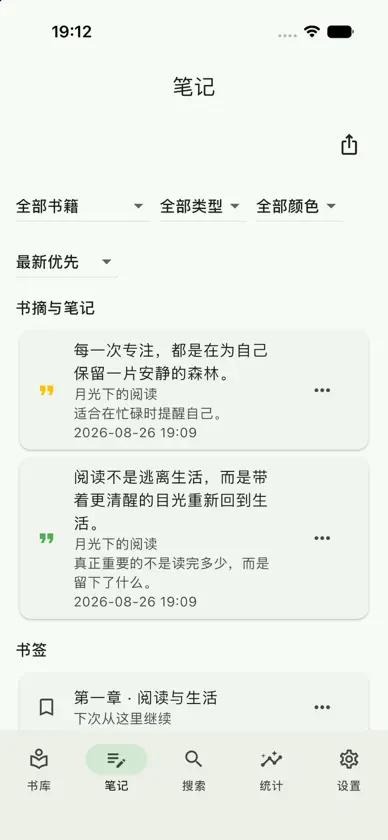
Leeef Reader is an offline-first, cross-platform ebook reader that keeps you in control of your data. Import and organize books without an account, then connect your own S3 or WebDAV storage when you want continuity across devices. MULTI-FORMAT LIBRARY Read EPUB, PDF, TXT, MOBI, AZW3, and FB2. Import from Files or the system share sheet, extract covers and metadata, and organize everything with shelves, tags, filters, and sorting. FOCUSED READING Enjoy interactive page curl on mobile, or choose slide, no animation, and continuous scrolling. Tune typography, spacing, margins, themes, dark mode, and Chinese text conversion. HIGHLIGHTS, NOTES, AND INSIGHTS Create bookmarks, highlights, and notes, review them by book or date, and export to Markdown, TXT, or CSV. Reading statistics help you understand time, streaks, and completion. AI AND CLOUD STORAGE CONFIGURED ON DESKTOP, SYNCED TO IPHONE Connect your own object storage and AI service on a computer for cross-device sync, explanations, translation, chapter summaries, and reading questions. The iPhone app does not include object-storage, AI, or cloud TTS endpoint, key, or provider entry; credentials reach iOS after you scan a pairing QR code or through trusted-device / cloud sync. YOUR CLOUD, YOUR DATA Leeef stores data locally by default and requires no account. Optional S3 or WebDAV sync keeps books, progress, highlights, and shelves in step across your devices. Some online features require a network connection. S3/WebDAV uses storage you provide. Storage and AI credentials are configured on desktop and synced; they are not purchased or entered in the iOS app.\n
What's new
Version 2.6.0 · Oct 1, 2026
- Settings can turn on sync for books and reading data. Books, covers, shelves, tags, excerpts, bookmarks, progress, and reading time are encrypted and sent to your own S3 or WebDAV. Until you turn it on, only configuration is synced. - Sync status shows the current stage, the file in transit, and how many records are still waiting. A failed sync can be retried. - Excerpts and reading positions keep earlier versions. You can compare and restore them after a deletion or overwrite. That history stays on this device. - A password-protected library backup can be exported. If books and covers together exceed 128 MiB, the export fails instead of writing a truncated file. - Select text while reading to explain, translate, summarize, or ask a follow-up with the model you already configured, and save the reply as a note. - The bookshelf shows only the search field until you open filters for status, sort, and tags. - On the phone, a finger slide now finishes the page turn, and the motion is smoother. An existing install does not start uploading the library until you turn that sync on in Settings.
More from Zhengzhou Binggui Network Technology Co., Ltd.

You might also like
 Koma Reader – Manga & ComicsLumino AI Co., Limited
 N2 文字語彙問題集Yamase & Touwa Japanese Insititute
 Everbound - eBook ReaderNeighborhood Nerd, LLC
 阅微 - EPUB 电子书阅读器ZhenDong Technology Co, Ltd
 Koodo Reader亮 郭
 Readest - eBook ReaderBilingify LLC
 KedaReader晖铠 陈
 菠萝包轻小说-二次元阅读神器Guangzhou Qingyue Network Technology Co.,Ltd.
 PureLibro: eBook Reader添欢 谢