
LoopTrainer
Panittha Suwannajang
3.7(3)MusicAges 4+
Screenshots


About this app
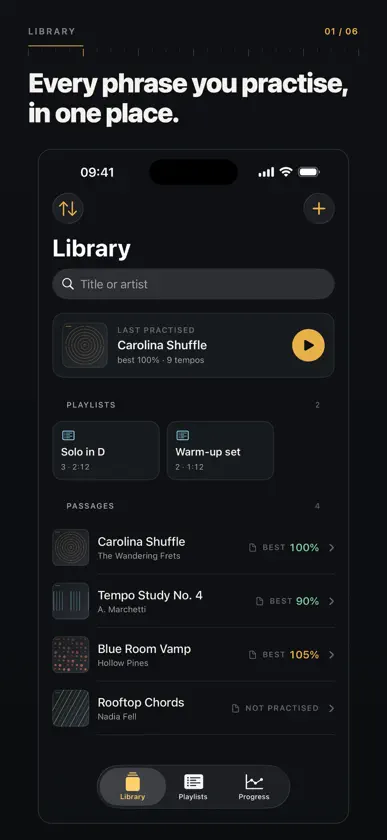
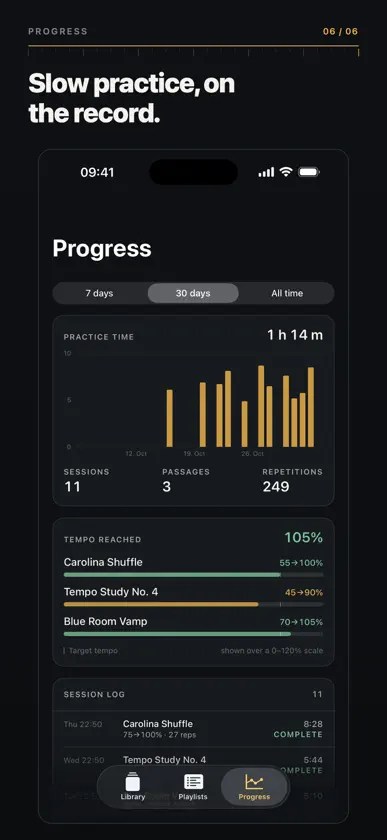
LoopTrainer is a practice tool for musicians: take the four bars you are stuck on, loop them, and raise the tempo in measured steps. HOW IT WORKS 1. Import a song from Files, or add one from Apple Music. 2. Drag the two brackets on the waveform to mark the passage you are working on. 3. Set a starting tempo, a target, a step and how many repetitions per step. 4. Press play. LoopTrainer repeats the passage and steps the tempo up, keeping the pitch. THE TEMPO LADDER Every tempo on the ladder is shown as a station with its repetitions, so you can see how far you have come and how far there is to go. Tap a station to jump to it, or drag the tempo scale to take over by hand — and go back to the ladder whenever you want. YOUR OWN FILES Import single files or a whole folder from the Files app, including iCloud Drive. Audio is copied onto the device once, so practice works without a network, and the LoopTrainer folder is visible in the Files app for songs you want to drop in. A RECORD OF THE WORK Every practice set is logged: which passage, which tempos, how many repetitions, how long. The Progress tab shows practice time over the last week or month, or all time, the tempo reached on each passage, and the sessions themselves. PLAYLISTS, AIRPLAY, BACKGROUND AUDIO Group passages into a playlist for a session, drag to reorder, and play through them. Works over AirPlay, Bluetooth and headphones, with lock-screen controls and background audio, so the phone can stay in your pocket. APPLE MUSIC IS OPTIONAL Search the catalog and add a song if you have an Apple Music subscription. Loop timing there is approximate; your own files are the precise path. NO ACCOUNT, NO TRACKING Everything stays on your device. There is no sign-in, no analytics and no advertising.
What's new
Version 2.0 · Nov 8, 2026
LoopTrainer has been rebuilt for a modern iOS, and it now does the things the first version could not. • Loop your own audio files, from Files or iCloud Drive, with a folder import that keeps nested folders intact • A tempo ladder you can edit: start, target, step and repetitions per step, with every station visible • Tap a station to jump to it, or drag the tempo scale and take over by hand • Pinch the waveform to zoom into the bars you are working on • Practice statistics: time practised, tempo reached per passage, and the sessions themselves • Playlists that play through a whole session • AirPlay, Bluetooth, lock-screen controls and background audio • Apple Music search, if you have a subscription
More from Panittha Suwannajang


You might also like
 MusicKeyRollMozusystems, LLC
 StringfloOshry Ben-Harush
 Mujo: Practice MusicMujo LLC
 Winter Zen - Snow Globe MusicApps Are Fun LLC
 AudioLiftMeet Jethwa
 Trumpet Tuner ™Kartika Ardiani
 SX1000 - Analogue SynthAudioThing Ltd.
 JAX DYNAMICS : CompressorJens Guell
 Fuzz Droid (Legacy)Sketch Audio, LLC
 Atelier MelodeeJustin Xin