
OffClock
Benjamin Pichel
No ratings yetProductivityAges 4+
Screenshots



About this app
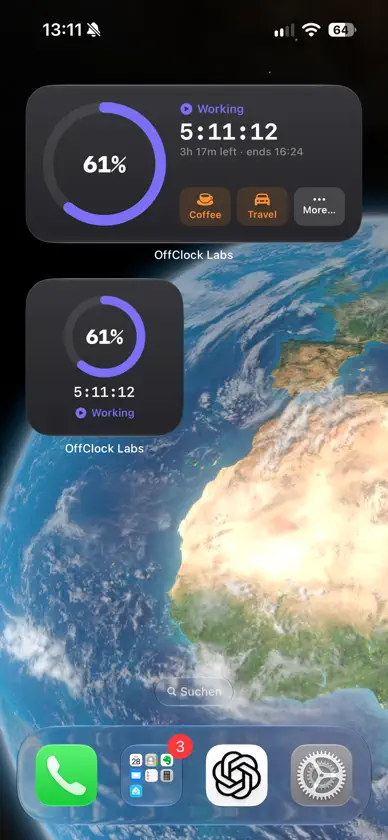
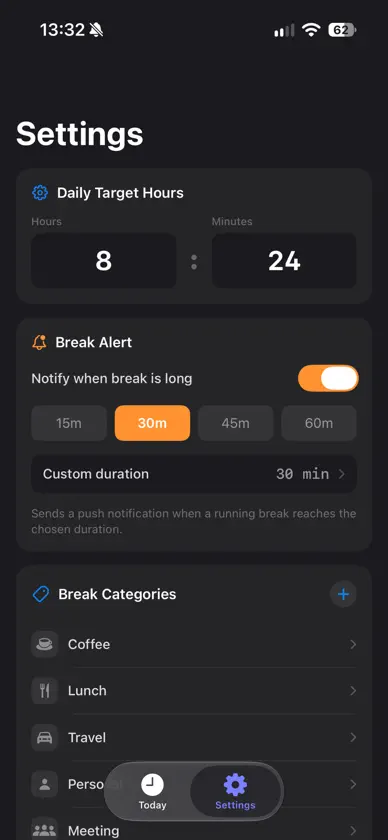
Your workday. On your iPhone, Apple Watch and Home Screen. OffClock helps you keep track of your working hours, manage breaks and know when your workday is done. Check your progress on your wrist or Home Screen, with quick controls that keep your day moving. OFFCLOCK ON APPLE WATCH Your workday is always within reach. Start working, take a break, resume and finish your day directly from your Apple Watch. See your worked time and progress towards your daily target at a glance, with your workday synced to your iPhone. YOUR WORKDAY ON YOUR HOME SCREEN See how your day is going without opening OffClock. Choose a small or medium widget to keep your working time and progress in view. The interactive medium widget lets you start working, take a break and resume right from your Home Screen. KNOW WHEN YOU’RE DONE Set your daily target and follow your progress with a live timer and a colourful progress ring. See how much you’ve worked, how much time remains and when you’re expected to finish. Breaks are deducted automatically, and your estimated finish time adjusts throughout the day. BREAKS THAT FIT YOUR DAY Track multiple breaks, from a quick coffee to lunch or time away from your desk. Add breaks manually using a duration or start and end times, and edit them whenever needed. Use the included categories or create your own with custom names and icons. KEEP YOUR BREAK IN VIEW Follow your running break timer on the Lock Screen and in the Dynamic Island on supported iPhones. Set an optional reminder for when your break reaches your chosen duration. SIMPLE AND PRIVATE Start your workday with a tap or enter an earlier start time. Finish your day to stop the clock and see how your worked time compares with your target. No account required. Your workday data is stored locally, with no server uploads. Core tracking works offline, and time displays follow your device settings. OffClock focuses on today: your start time and breaks reset when a new day begins, while your daily target and preferences stay saved. On your wrist. On your Home Screen. On top of your day.
What's new
Version 1.4.1 · Sep 30, 2026
OffClock is now on your Apple Watch and Home Screen! NEW APPLE WATCH APP Start your workday, take breaks, resume and finish directly from your wrist. Check your worked time and daily progress, synced with your iPhone. NEW HOME SCREEN WIDGETS Keep your workday in view with small and medium widgets. Start working, take a break and resume directly from the interactive medium widget. ALSO NEW • A redesigned Today view with a live work timer and progress ring. • Multiple editable breaks and custom break categories. • Optional break reminders. • Live break timers on the Lock Screen and Dynamic Island. • Improved timer display and widget updates when resuming work.
You might also like
 SeeLock: Phone Lock TimerTomoki Uda
 ProgressTimer - Bar TimerTaniguchi Yota
 TimerBar: Presentation TimerHwechul Cho
 Shifts: Work Schedule PlannerDharmesh Jethwaa
 Text Extractor! images to textluca calciano
 Timery: Time TrackerJoseph Hribar
 Ashjar SpaceCompany ASHJAR for beverages
 Cryptomator: Protect PrivacySkymatic GmbH
 WorkingHours • Time TrackerTimo Partl
 Jira Data CenterAtlassian