
Screenshots


About this app
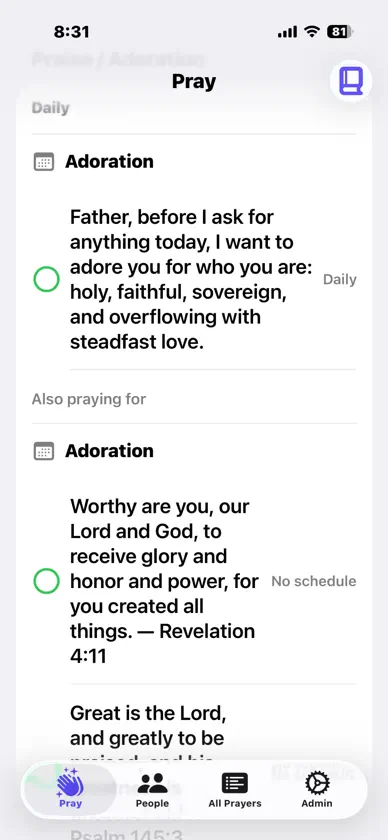
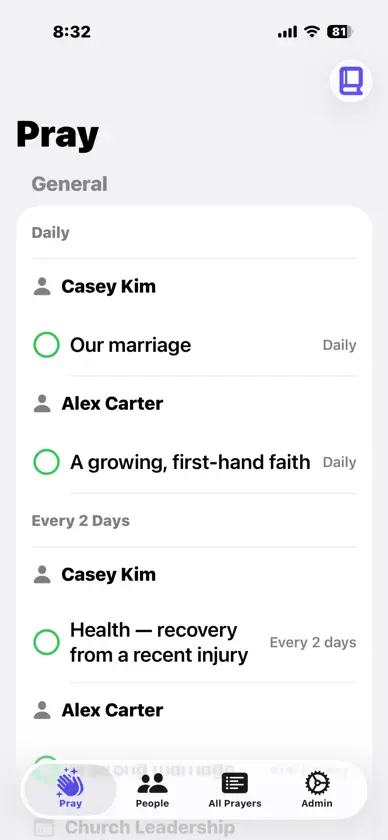
PrayIt is a quiet, personal way to pray for the people and things that matter to you — and to actually keep it up. Add the people and events you want to pray for, sort them into categories like Family, Church, and Friends, and give each one a list of specific requests. Then open the Pray tab each day and PrayIt walks you through them, one category at a time. HOW IT WORKS • Add people and events, and group them into categories you set • Write as many prayer requests as you like under each one • Give a request a rhythm — daily, weekly, every few days — or leave it unscheduled • Open the Pray tab and move through your list, marking each request as you pray STAY ON TOP OF A LONG LIST • Unscheduled requests rotate a handful at a time, so you cover everyone over days and weeks instead of facing a wall of text every morning • Scheduled requests are spread evenly across the calendar automatically, so no single day is overloaded • Pick up exactly where you left off — today, tomorrow, or next week RECORD WHAT HAPPENS • Mark a request answered with a note, and it moves to your Answered list • Add dated updates to anything ongoing, without closing it out • Review everything in one place — Active, Answered, or All — and share or export a plain-text prayer list A DAILY DEVOTIONAL, IF YOU WANT ONE • Start each session with a verse and a prayer • Write your own to cycle through, or use a bundled public-domain classic: Spurgeon's Morning and Evening, or Streams in the Desert • Import your own devotionals in bulk from a spreadsheet YOURS, AND ONLY YOURS • Syncs across your iPhone and iPad through your own iCloud account • No account to create, no ads, no subscriptions, no tracking • Nothing is ever sent to us — we have no servers and no way to see your list • Back up and restore your whole list as a file whenever you like Requires iOS 17 or later.
What's new
Version 1.4 · Nov 4, 2026
Requests that end. Praying for a friend through a two-week trip, or a short illness? Give the request a last day (Edit Request → Duration → Ends on a date). It’s marked “Ends in 3 days” as the day approaches. “Is this one over?” After the last day, PrayIt asks when you next open the Pray tab: extend it a little longer, mark it answered (with a Thanksgiving reminder if you like), or delete it. Requests with an end date show up in People and All Prayers too, so you can see what’s coming up. End dates are included in your backups.
More from Bruce Barclay


You might also like
All apps like PrayIt → Prayer Today: Daily PrayersFeel Tomorrow LLC
 Earth Nail SpaEarth Nail Spa
 Steward+Helm: Home, RedefinedYardi Systems, Inc.
 Hiatus SpaHiatus, LLC
 PandoAppGod Behind Bars, inc.
 Follow Jesus: ObeyStamped
 My Spiritual Toolkit AA StepsLOOK BEFORE YOU LEAP NET, LLC.
 Daily Prayer AppRethinkMe LTD
 Bible Verses ++John Harvey
 ScreenLogic ConnectPentair Water Pool and Spa, Inc