
Screenshots






About this app
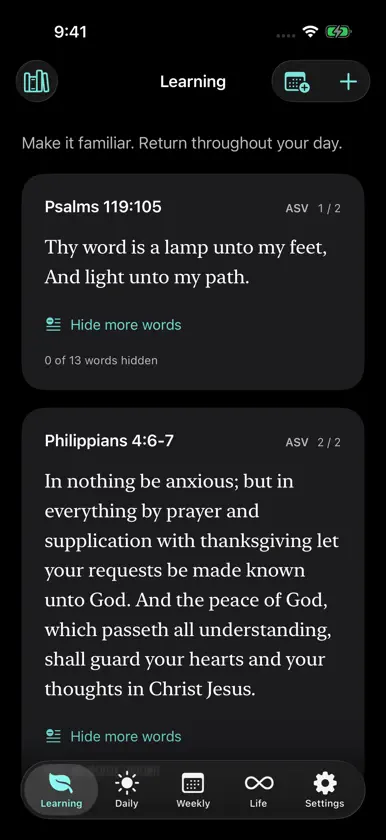
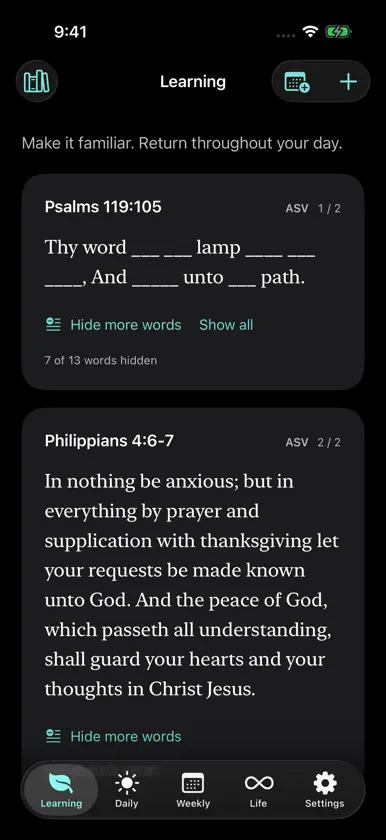
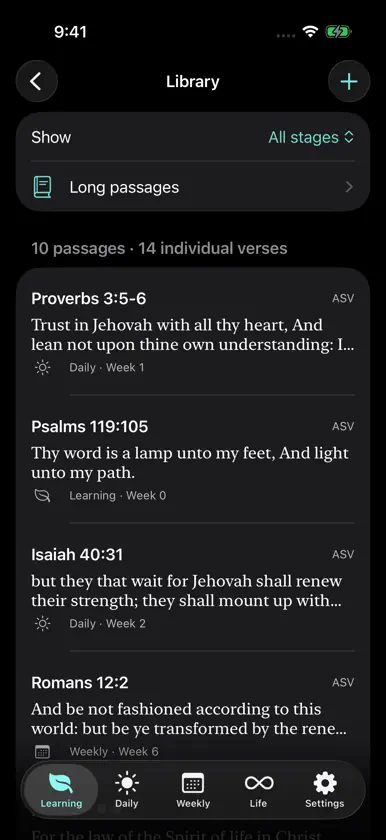
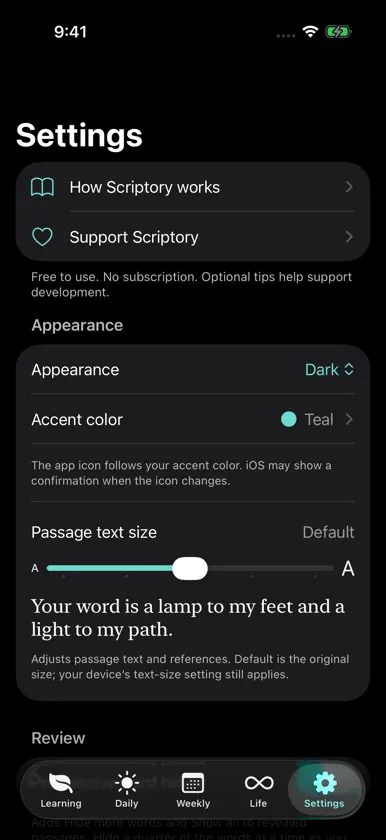
Make Scripture part of your everyday life. Scriptory helps you learn passages and keep returning to them as they become familiar. A rhythm that grows with you Start in Learning, then move passages through Daily, Weekly, and Life review. Start each new week when you're ready. Your progress follows your pace. Practice in different ways Reveal a passage or its reference as you review. Enable progressive word hiding to practice with fewer visible words. Connected passages are grouped automatically for section-by-section, build-up, or full-passage review, including passages that cross chapter boundaries. See your growing library Browse and search saved passages across every review stage. See both your passage count and individual verse total, with overlapping references counted once. Make it yours Look up a Bible reference and add the passage automatically. Choose ESV (2007 text edition), NASB 1995, NASB 2020, KJV, ASV, LSV, Darby, YLT or WEB. You can also type or paste text from your preferred translation, or select None for manual entry only. Choose an accent color, light or dark appearance, and a comfortable passage text size. The app icon follows your accent color. Keep the words nearby Review Learning passages in Home Screen widgets and cycle between them when you have more than one. Add a Lock Screen widget to keep a passage reference nearby and open Learning with a tap. Set a daily reminder at a time that suits you. Saved passages are available offline; lookup and iCloud transfers require an internet connection. Keep a copy Export your library to Files, import a Scriptory backup, or enable automatic iCloud backups. Import a Scriptory JSON backup or an original Scriptory plist library. For NASB and ESV passages added through lookup, backups preserve references and progress; the text downloads again when you restore online. Manually entered passages retain their text in backups. iCloud backup creates library snapshots rather than continuous synchronization between devices. Free to use All features are free. Optional, one-time tips support development. You can tip again whenever you like, with no subscription or feature unlock required.
What's new
Version 2.0.3 · Nov 10, 2026
What's new in 2.0 - A refreshed interface with Learning, Daily, Weekly, Life, and Settings tabs. - Home Screen widgets with passage cycling, plus Lock Screen reference widgets. - Bible reference lookup for ESV (2007), NASB 1995/2020, KJV, ASV, LSV, Darby, YLT and WEB. - Progressive word hiding and automatic long-passage practice. - Optional iCloud backups, library import/export through Files, and import of original Scriptory libraries. - Library totals for passages and individual verses. - Free daily reminders that save automatically. - Accent colors, matching app icons, light/dark appearance, and adjustable passage text. - Optional, repeatable one-time tips. Every feature stays free. What new in 2.0.1 and beyond - Discover Holy FYP, a swipeable feed of Scripture and Christian reflections, from Settings. - Fixed a notification clearing bug - Optimized widgets
In-app purchases
The most popular purchases on the App Store.
- Enable RemindersConsumable$0.99
- Dinner for Developer & WifeConsumable$5.99
- Coffee for DeveloperConsumable$1.99
- Snack for DeveloperConsumable$3.99
- Large tipConsumable$9.99
- Medium tipConsumable$4.99
- Small tipConsumable$1.99
More from Seth Parsons


You might also like
 Bible Memory Helper山 汪
 Hide The Word - Bible MemoryVanlab Technologies
 TestimonioStanley Yang
 Good Soil Bible MemoryGood Soil Apps LLC
 Memorize Scripture (EthnosDev)EthnosDev
 Bible Memory VersesGreat Commission Software, Inc.
 Verses for LifeCalvin Freitas
 Bible Memory by MemLokAgileBuilders
 Scripture SingerAdvent Herald Academy, Inc.
 Bible Memory: VerseLockerSMF