
SeClock: Seconds Clock Widget
Kiichi Ito
4.9(8)UtilitiesAges 4+
Get it free on the App StoreOpens Apple's App Store
Screenshots

About this app
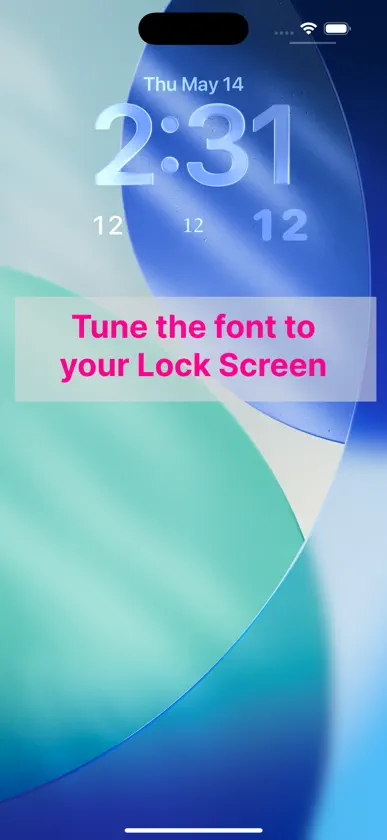
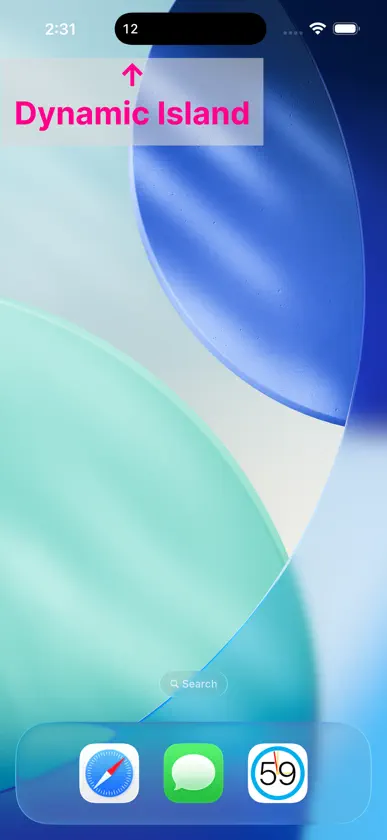
SeClock shows just the seconds on your Lock Screen or Home Screen — the part the system clock leaves out. Long-press the Lock Screen or Home Screen to add the widget. An in-app purchase lets you tune the font, weight, size, and opacity so the seconds blend into your setup. Prefer the Dynamic Island? Tap the button in the app to start a Live Activity that keeps seconds ticking there for up to about 8 hours. You can also use the app itself as a fullscreen HH:MM:SS clock. *Widgets and Live Activities may be off by up to about 1 second.
What's new
Version 1.2.2 · May 18, 2026
- Restored the rectangular Lock Screen widget. - Added the ability to send feedback.
In-app purchases
The most popular purchases on the App Store.
- Lock Widget CustomizationConsumable$2.99
More from Kiichi Ito


You might also like
All apps like SeClock: Seconds Clock Widget → Smart Digital & Analog ClockYuuki Shimizu
 Clock Widget - Ultra HD Time旭 林
 Digital Clock - Neotaishin miyamoto
 Mugen ClockKoichiro Kamada
 SFClockYafei Dong
 Minimum ClockMihoko Araki
 Exact SecondsVagram Malkhasian
 Seconds Clock: Floating & Desk杰 曹
 Digital Clock - Advance TimeShuichi Nagao
 Clock Widget CreatorRemi Herbiet