
SpeakDraft
Christopher Dieckmann
No ratings yetUtilitiesAges 4+
Screenshots



About this app
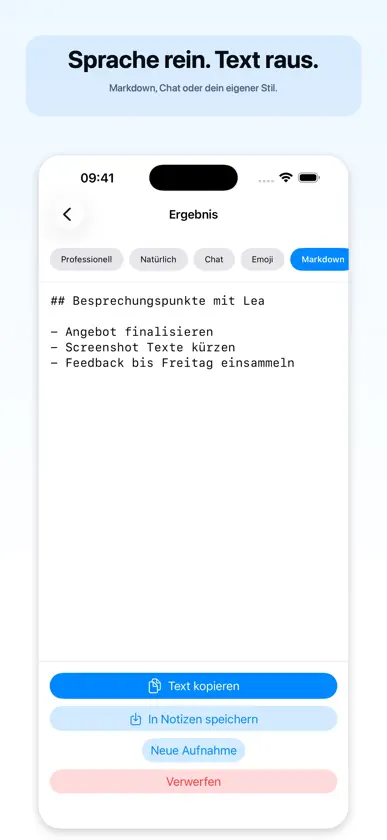
In the car. The perfect email pops into your head. You can’t type. On the couch. You know what you want to write, but not how. On your Apple Watch. A thought, before it’s gone. SpeakDraft turns your speech into finished text, in seconds. Just speak. AI transcribes and shapes the text to exactly the tone you need. No editing required. Five modes, one tap: • Professional: Clear and factual, ideal for emails and reports • Natural: Smooths out filler words, preserves your tone • Chat: Short and direct for WhatsApp & iMessage • Emoji: Casual and lively for social media • Markdown: Structured notes with lists and headings You can switch modes in the results at any time without re-recording. On-device (beta): With Apple Intelligence (iPhone 15 Pro or later, iOS 26 or newer), SpeakDraft can also transcribe and format recordings right on the device, with no OpenAI key and, once the language data is downloaded, offline too. The on-device model is smaller than GPT and does not support every language. OpenAI stays the default, and the app never switches on its own. Apple Watch: Record right from your wrist, even when your iPhone isn’t nearby. Recording can start automatically when you open the app, or with a tap on the complication. Markdown recordings automatically save to your Notes app as soon as you’re connected. Quick to start, always with you: • Home screen widget and Shortcuts • Record directly from Control Center (iOS 18+) • Live Activity on the lock screen • Apple Watch complications More control: • Choose your output language: German, English, Spanish, French, and more • History with search and filters. Nothing gets lost • Custom terms for better recognition of names and technical terms • Accent colors and Dark Mode Your data, your choice: SpeakDraft works either with your own OpenAI API key or on the device. With OpenAI: no subscription, no intermediary servers, costs are billed directly and transparently through your account, and your key remains secure in the iOS Keychain. On the device, recordings and text stay on the device. Requirements: either your own OpenAI API key (platform.openai.com) and an internet connection, or an iPhone with Apple Intelligence (iPhone 15 Pro or later, iOS 26 or newer) for on-device mode.
What's new
Version 1.8 · Nov 10, 2026
New in version 1.8: Clearer before you record The home screen now shows which mode and language your text will be created in. The mode bar starts on the left, fades at the edge to show that it scrolls, and when you reformat, the current mode is marked with a checkmark. View the original Under every result you can now expand the recognized original (the speech recognition text). That makes it quick to check whether the app understood a name or technical term correctly. History The filters are now three menus: period, mode and tags. The sections are called "Today" and "Yesterday". Delete is in the "..." menu of the detail view, with a confirmation first. Settings Reorganized: processing is at the top, followed by everything about OpenAI (models, key and this month's cost), then recording and output. Notifications The app no longer asks for notifications at launch. It explains what they are for first, when the first recording from your Apple Watch arrives.
More from Christopher Dieckmann


You might also like
All apps like SpeakDraft → Mute It: Remove Video AudioMUSADDIQ ELAHI
 Nunodori: Fabric Planner福州市鼓楼区荣荣森网络科技有限公司
 Flipora: Flip Clock & AlarmsHuseyin Bicen
 Scanely: QR Code GeneratorHuseyin Bicen
 RefoMeasure: Renovation Calc福州市鼓楼区荣荣森网络科技有限公司
 WakeRally: Mission AlarmWuhan Jiange Technology Co., Ltd.
 Cloak: Offline AIPolyaura LLC
 BlurBefore - Redact & Pixelate军 孙
 Sink It for YouTubeTony Sundharam
 FortiGate NOC Monitor超 张