
Screenshots



About this app
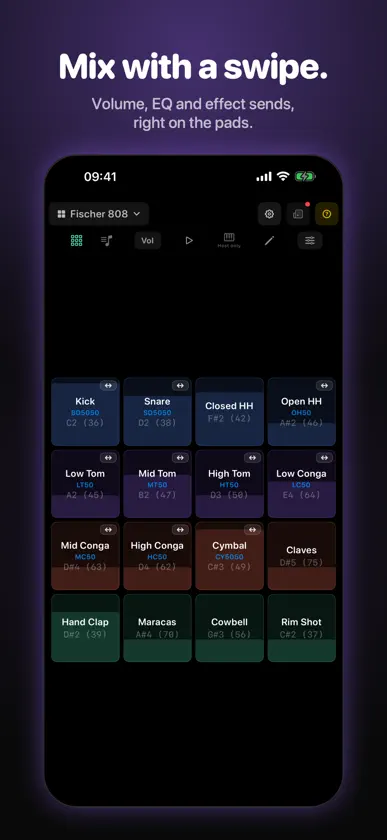
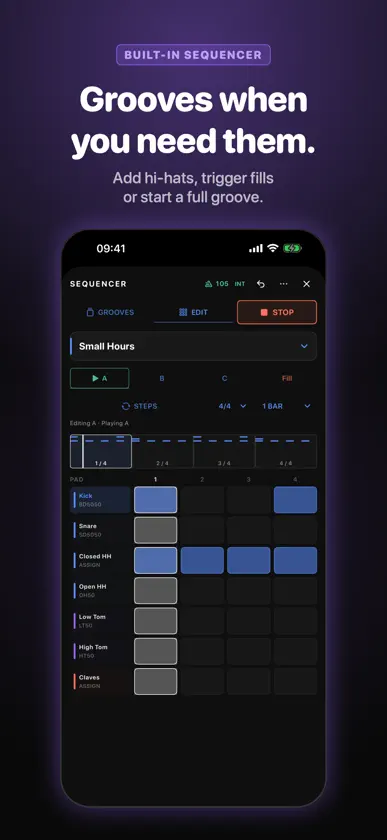
Tapko is a no-nonsense drum sampler for iPhone and iPad, built for live use. Load your sounds, shape your kit and play—standalone or inside your AUv3 host (AUM, Loopy Pro, GarageBand, Cubasis, and more). Swipe to mix, connect your MIDI controller and add a groove when you need one. 16 PADS, TOTAL CONTROL • 16-pad grid with per-pad sample import (WAV, AIFF, MP3, M4A, FLAC, CAF) • Per-pad 3-band EQ, volume, pan, gain, choke groups, and Fade Out • Swipe pads to set volume, EQ, pan, reverb send, and delay send on the fly • MIDI Learn — tap a pad, play a note, done • Swipe left/right on single-sample pads to cycle saved versions • Varispeed pitch per pad, per velocity layer, and per round-robin sample SOUND FX ON EVERY PAD • Pitch envelope, transient shaper, saturation, bitcrusher, and a resonant filter with a per-hit sweep • Everything is automatable from your host TAPKO SPACE REVERB & DELAY • Reverb: Room, Plate, Hall, and Cosmos, with Space, Decay, Pre-delay, Color, Clarity, and Modulation • Delay: Clean, Warm, Diffuse, and Reverse, synced to your host's tempo (1/2 to 1/32, straight, dotted, or triplet) or free-running, and it can feed its echoes into the reverb • Per-pad sends and dry level, global wet levels • Drum-focused factory presets plus your own, to save, export, and import; shared kits sound the same anywhere ADVANCED SAMPLING • Velocity layers — up to 5 per pad with adjustable ranges • Round robin — up to 5 samples per pad, sequential or random • Layer mode — stack up to 5 samples and trigger them together • Sample Editor with a zoomable waveform, trim handles, start delay, attack, and gain. Play sounds exactly like hitting the pad • Render Pad — bounce a pad to a new sample with its EQ, pitch, Sound FX and, if you like, reverb and delay baked in • Sample Recorder (standalone app) — record from the mic or an audio interface straight into your Media Library • Global Media Browser — import clips once and use them in any kit, with nested folders, multi-select, and export/import KITS & SHARING • Create, rename, duplicate, and delete kits; import and export .tapkokit files • Sort your kits into categories • Kit Store — browse featured kits and categories and download free community kits, with each kit's icon and info kept in your kit list • Full backup of kits, media, and presets to one .tapkobackup file • iCloud backup and restore with live progress • Web Manager (Beta) — edit kits and your Media Library from a browser on your computer BUILT-IN SEQUENCER • A bonus for when you want a groove: open it from the toolbar, press Play, and your own kit plays the pattern • Ready-made grooves plus percussion and hi-hat parts, each with A, B, C loops and a Fill • Switch loops and trigger fills while it plays; changes land on the next bar • Step editor with velocity and extra reverb or delay per hit; save your own patterns and share grooves as files • Assign each instrument to any pad, per kit • Internal clock, or follow your host's tempo and transport • Control it from function pads, host parameters, or MIDI CC (optional preset on channel 16) MULTI-OUTPUT ROUTING • 9 stereo outputs (1 Main + 8 Aux) for multi-output hosts • Send any pad to its own Aux bus for separate mixing MIDI & HOST INTEGRATION • MIDI input with customizable note mapping (GM drums by default) • Per-pad MIDI channel (omni or 1–16) • Chromatic MIDI Channels (Beta) — play each pad chromatically from its own channel • MIDI output and Program Change for kit switching • Function pads — one tap can mute pads, switch effects, set sends, play pads, send MIDI CC, or load a kit, and your host can press them too • Pad, Sound FX, and Mixer parameters automatable from the host BUILT FOR PERFORMANCE • Real-time C++ DSP engine with vDSP acceleration, designed for low CPU use • Standalone: optional Play in Background (Settings > Other) • 48-voice polyphony with smart voice stealing
What's new
Version 3.0 · Nov 3, 2026
Tapko is still a no-nonsense drum sampler built for live play. Version 3.0 adds a built-in sequencer, for the times you want a groove under your pads. • Built-in sequencer: open it from the toolbar and press Play. It plays your own kit, so every pad keeps its samples, layers, round robin, Sound FX, sends, and outputs. • Grooves: pick from ready-made grooves, or start from a blank pattern. Percussion parts and hi-hat grooves add to what you play. • A, B, C, and Fill: three loops and a fill per groove. Switch loops or trigger a fill while it plays and the change lands on the next bar. • Feel: Intensity, Humanize, and Swing sliders shape the groove as you play. • Step editor: tap to add or remove a step, hold a step and swipe to change its velocity. Add extra reverb or delay to individual hits, place hits between steps, and undo mistakes. • Save your own patterns, keep them in My Grooves, and import or export groove files. • Assign instruments to pads: each sequencer instrument can be bound to any pad of the kit, shown with the pad's own name and colour. • Clock: run on Tapko's internal clock, or follow your host's tempo and transport. The groove's suggested tempo never changes your host. • Control it live: new Sequencer actions for function pads, host-automatable parameters, and an optional MIDI CC preset (Tapko Standard, channel 16) for foot controllers and pads. • Standalone background playback: turn on Play in Background in Settings > Other to keep Tapko sounding when you switch apps. • The sequencer is optional. It does nothing until you press Play, and your kits and the .tapkokit format are unchanged. Also new since the last App Store release (2.8): • Sound FX on every pad: pitch envelope, transient shaper, saturation, bitcrusher and a resonant filter, all automatable from your host. Off until you turn them on. • Function pads can do several things at once: mute pads, switch reverb or delay, set sends, toggle Sound FX, play pads, send MIDI CC or load a kit, as a toggle or while held. • Redesigned Kit Store with featured kits, categories and kit icons; downloaded kits keep their details. • Kit categories: group your kits into collapsible sections. • Long-press the swipe-mode button to jump to any mode. • Media Browser: export a whole folder, a selection of clips, or a single clip. • The Kit Store button is easier to spot in the kit list. • Lower idle load: the reverb and delay now rest when nothing is playing and nothing has changed. • Fixed MIDI events that arrive together in one packet. • Tapko is designed for low CPU use, so it can sit comfortably in a busy live rig.


