
Workouts Timer
Eduardo Sanches Bocato
No ratings yetHealth & FitnessAges 4+
Screenshots




About this app
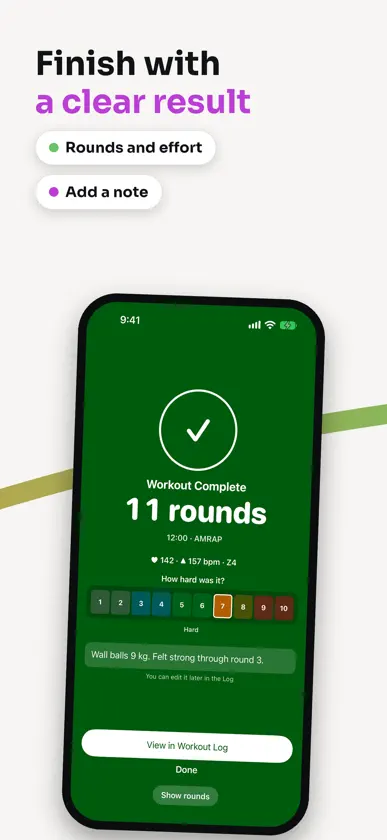
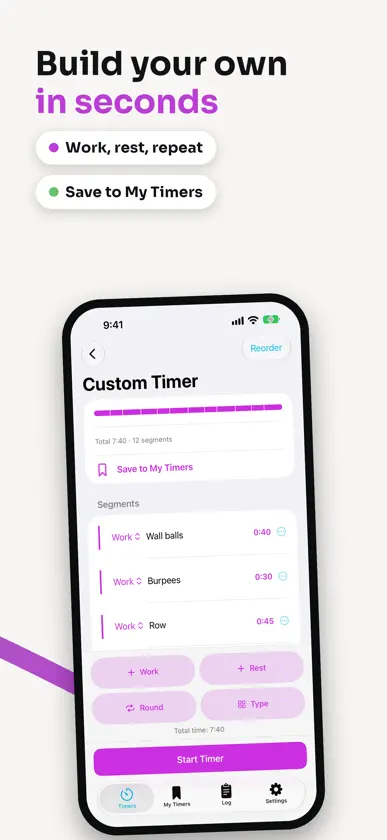
Workouts Timer is a focused, no-frills interval timer built for high-intensity circuit training — AMRAP, EMOM, Tabata, For Time, and fully custom work/rest sequences, all in one app. FEATURES • AMRAP — race the clock and tally your rounds as you go • EMOM — every-minute-on-the-minute intervals with configurable work and rest • Tabata — classic work/rest sets with round tracking • For Time — race to finish, with or without a time cap • Custom — build your own sequence of work and rest segments, name them, and repeat it for as many rounds as you like • My Timers — its own tab: save any timer, in any format, find it again by name and start it in one tap - Home Screen widgets to open a saved timer straight from your Home Screen DESIGNED FOR THE GYM • Large, glanceable countdown ring visible from across the room • Turn your phone sideways for an even larger clock in landscape • Audio, voice, and haptic cues for every phase change, so you never need to look at your phone mid-set, even with the screen locked • Quick controls: switch sounds, voice cues and haptics or make the digits bigger mid-workout, without pausing • Live Activities: follow the timer on the Lock Screen and in the Dynamic Island, pause or resume without opening the app • Colorblind-safe color palette • Full support for larger Dynamic Type text sizes TRACK YOUR WORK • Optional Apple Health: see heart rate, zones and a heart-rate graph during a workout and in your log. Your health data never leaves your device • Every completed workout is saved to your on-device Workout Log • Review duration, rounds, and a full round-by-round breakdown after every session • Add a note to any workout, and see your week at a glance: workouts, minutes and your streak Available in English, Dutch and Brazilian Portuguese. Workouts Timer works completely offline and never requires an account — your data stays on your device.
What's new
Version 1.2 · Nov 11, 2026
NEW IN 1.2 • My Timers: save any timer, search by name, sort by last used and start one with its play button. • Recent: restart one of your last 10 workouts with a tap. The timer grid follows your recent use. • Home Screen widgets: open saved timers. The medium widget shows your three most recently used; the small one shows your pick. • Workout Log: see your week at a glance, with workout names first and full details. Delete one or more workouts. • Add notes and effort ratings to workouts; notes appear when you share a workout. • Timer setup: reuse recent values in every format. Tap any time to type it, and an EMOM total always matches its rounds × interval. • Duplicate a saved timer from its menu, then name the copy. • Settings are now grouped into Cues, Clock, Apple Health and App. • Pause is clearer on the timer and in Live Activities. Stopped workouts show their partial result. • Workout Complete: the timer smoothly transforms into your results. • Apple Health: see heart rate and zones during a workout and in your log. Rate your effort or optionally save a session when no other app recorded it. Saved sessions mark pauses and resumes; the live heart-rate screen keeps time with your workout. Show Calories is an optional setting. With an Apple Watch workout, the live heart-rate display shows when it last updated, and a Zones | Graph switch plots your heart rate across the whole workout. Your data stays on your device. • Landscape: turn your phone sideways for a larger clock and a workout timeline that keeps the current segment on top. • Custom Timer: a named segment shows its name in large type and is spoken when it starts. Turn either off in Settings under Cues. • Type up to 99:59 for each interval and up to 24:00:00 for a full workout. • Quick controls change sound, voice cues, haptics and digit size without pausing. The larger digit sizes now scale all the text on the timer. • Cues keep playing when your phone is locked or you switch apps. Lower Other Audio During Cues is an optional setting. • Timer colors and controls have clearer contrast. • Recent cards share one size. • Fixes: Live Activity clocks stay correct after the app has been in the background; AMRAP Live Activities show the right round count; long EMOM and Tabata times read as clock times; Workout Complete scrolls at every text size; large text no longer hides the last item; timer names save exactly as typed.
You might also like
All apps like Workouts Timer → Bell to Bell: Round TimerBERK ERDOGAN
 Fight Clock. Boxing TimerBogdan Kostyuchenko
 HydroNudge: Water TrackerYasin Cetin
 Round Timer: HIIT & TabataSandeep Bhandari
 Rounds — Boxing TimerTomas Padilla
 Ridma: Eating Window TrackerOolu Studio
 WODR - HIIT & WOD GeneratorBlack Ueli GmbH
 RoundBeat: Workout TimerAndrei Gulyaev
 Peekaboo TimerAnton Palchyk
 TimeFit - Workout Helper明 李