
Lorebind: Worldbuilding Notes
Yuichiro Suzuki
No ratings yetProductivityAges 4+
Screenshots



About this app
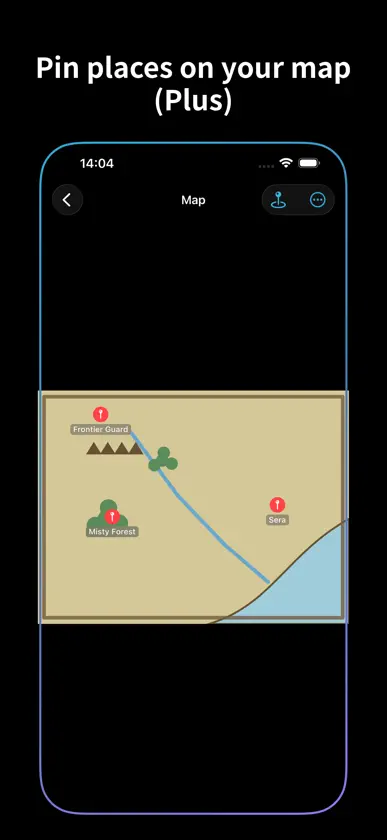
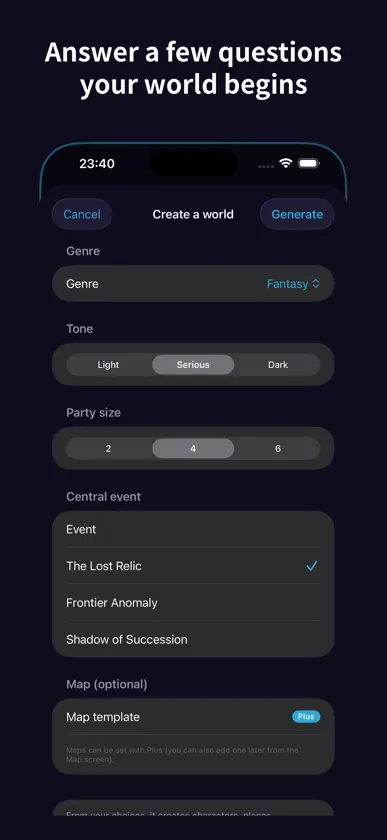
Bring your scattered "settings" into one world When you build a long story, your characters, places, organizations, terms, and historical timeline end up scattered across memos and spreadsheets. "Where did I write that character again?" — that search kills your creative momentum. Lorebind is a "second brain" for your worldbuilding, made for novelists, TTRPG game masters, and every kind of creator. Even on the free plan, there's no limit on the number of entries in a world. No ads, no tracking. How worlds work - One story = one world. Put a whole novel or a whole campaign into a single world. - Even if you only half-remember a name, fuzzy search finds it — inside a world, or across all of them. As your projects grow, you never have to remember which world you wrote something in. What you can do - Organize characters / places / organizations / items / terms / events by type, and pick an icon color for each entry - Answer a few questions and auto-generate a starter world (characters, places, relationships, timeline) — no more blank page - Turn names in your text into links with "[[" or "@". Jump to related entries instantly, and see what references them with backlinks - Visualize how characters and factions connect with a relationship map — filter by type and spread it out with two fingers - Fuzzy search and tags to solve "what was that character again?" - A timeline that supports fictional calendars - Attach images like portraits and covers (Plus) - Drop pins on a map image to see how places relate (Plus) - Export your whole world to Markdown for backup (free). Formatted PDF export is Plus - Choose dark, light, or match your device (with a white or beige background in light mode) - Back up your data, and revert a world to an earlier saved copy - See how your favorite characters connect in one map with All relationships (up to five in the free version) Fully offline and privacy-first Write anywhere: on the train, on a plane, with no signal. Your data is stored on your device and never sent to our servers. No ads, no tracking. (If you're signed in to iCloud, you can share your worlds between your own devices via Apple's servers. Nothing is sent or received until you tap a button in Settings. Using iCloud is free.) Pricing Create one world for free and use the core features (entries, links, search, timeline, relationship map, world generation, Markdown export). For those who want more, there is the paid plan "Lorebind Plus": - Lorebind Plus: unlimited worlds / image attachments / map view / PDF export - Choose monthly, yearly (with a 7-day free trial), or a one-time purchase (yours forever) - Payment is charged to your App Store account - Subscriptions renew automatically unless auto-renew is turned off at least 24 hours before the end of the current period - You can manage or cancel anytime in Settings. Canceling never removes the worlds or images you've created. If you've had at least one paid period, you can keep editing all your worlds after canceling. If you cancel during the free trial, any additional worlds created during the trial become read-only (your first world always stays editable). Bring the world in your head into your pocket. Build your story world, more freely, with Lorebind. Lorebind Plus (auto-renewable subscription) - Monthly / Yearly plans (a one-time purchase is also available) - Payment is charged to your Apple ID at confirmation of purchase - Renews automatically unless canceled at least 24 hours before the end of the current period - Manage or cancel anytime in Settings > your Apple ID > Subscriptions Terms of Use (EULA): https://kabosuburi5555-commits.github.io/lorebind-legal/terms_en.html Privacy Policy: https://kabosuburi5555-commits.github.io/lorebind-legal/privacy_en.html
What's new
Version 2.4.0 · Nov 15, 2026
What's new in this version: - The app is now available in German, French, Spanish, and Portuguese (Brazil). It follows your device's language setting. - On devices set to a language other than Japanese, English, or these four, the app now appears in English (previously it appeared in Japanese). - New users now see a “First steps” card on a world's home screen. It guides you through four steps in order: Create a world, Create three characters, Connect them, and Open the relationship map. Tap Close to hide it at any time. - On a world's home screen and in the tag list, when you use larger text or a name is long, the count now moves below the name so words aren't split in the middle. - In languages other than Japanese, lists such as entry types are now separated with commas instead of “/”. - The privacy policy is now available in six languages. The app opens the version that matches its display language. Still worth repeating from versions 2.3.15 and 2.3.14: - The All relationships screen now has a two-line title: “All relationships” and the world's name. On narrow screens, such as iPhone in portrait, Edit layout at the top right is now an icon button (a square with a pencil), so the title fits. - In the relationship map, if a relationship label still overlaps a name after being moved aside, the label is now drawn in front of the name. - Added All relationships. Tap All relationships on a world's home screen to see how your favorite characters are related, all in one map. Spread two fingers to zoom in and see their circles, relationship labels, and arrows. The free version shows up to five favorite characters; Lorebind Plus shows them all. - With Lorebind Plus, tap Edit layout in All relationships to drag circles anywhere and keep that arrangement. Tap Reset to auto layout to go back to the automatic arrangement. - With Lorebind Plus, turn on Line colors in View to give each type of relationship its own line color and style in both the relationship map and All relationships. It's off by default. - With Lorebind Plus, touch and hold a circle in the relationship map, then drag it to change that entry's distance (Near, Medium, or Far). Tap Undo at the bottom soon after to change it back. - Tap Share at the top right of the relationship map or All relationships to save or share the map as an image. In the free version, a “Lorebind” watermark appears below the image. With Lorebind Plus, you can save images without a watermark, or as a PDF. For the relationship map, the page currently shown becomes the image. - In the relationship map and All relationships, names and relationship labels now have a background behind them, and ring names and labels are placed where they are less likely to overlap names. - Added Crash reports on this device to Settings. It shows how many crash reports iOS has delivered and when the last one arrived. They are kept only on this device. Nothing is sent anywhere. - The How-to guide now explains All relationships and saving maps as images. - If you use Lorebind on more than one device, update all of them to the latest version before using Upload to iCloud or Download from iCloud.
In-app purchases
The most popular purchases on the App Store.
- Lorebind Plus (One-time)ConsumableUSD 49.99
- Lorebind Plus (Yearly)Subscription · 7 days free trialUSD 19.99 / year
- Lorebind Plus (Monthly)SubscriptionUSD 2.99 / month
You might also like
All apps like Lorebind: Worldbuilding Notes → Story World BuilderJIhyoung Seol
 World Builder: Story PlannerEYUP OZTURK
 OCKit: OC Character OrganizerPROODO LABS LIMITED
 TomeWorlds: World BuildingDigital Coffee
 Story WikiColin Wright
 Character Resume: OC ProfilesSeiya.k
 Myriad WorldsDamien Anthony Lavizzo
 Ocie: OC OrganizerJeremiah Siror
 Writers StudioJoshua Cavell
 Timeline-O-TronBenjamin Robert Long