
SplitBear
drew Bernard
No ratings yetFinanceAges 4+
Screenshots




About this app
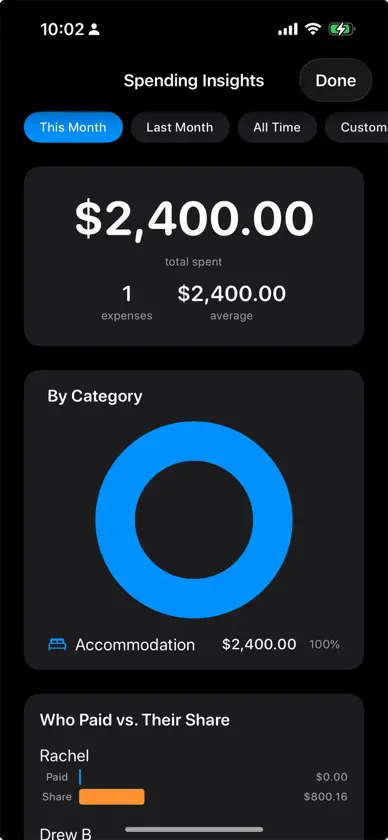
Tired of awkward "you owe me" conversations? SplitBear makes splitting expenses effortless. Whether you're sharing rent with roommates, splitting a dinner tab, or tracking costs on a group trip, SplitBear handles the math so you can focus on the fun. ADD AN EXPENSE IN SECONDS Tap the amount, pick who paid, and you're done. SplitBear splits it evenly by default, or customize the split by percentage or individual items. Import recent Apple Pay transactions with one tap, or snap a receipt and SplitBear reads the total automatically. SEE WHO OWES WHAT — INSTANTLY Open any group to see your balance at a glance. SplitBear uses a smart algorithm that minimizes the number of payments needed, so instead of everyone paying everyone, you settle up in fewer steps. Send friendly payment reminders with a tap when balances are overdue. BUILT FOR EVERY GROUP Create unlimited groups for different circles — roommates, trips, couples, friend dinners. Multi-currency support with live exchange rates for international trips. Save expense templates for recurring bills like rent and utilities. Set balance threshold alerts so you know when debts are getting large. Export expenses to CSV for your records. SMART FEATURES THAT SAVE TIME Receipt scanner reads totals, merchant names, and dates automatically. Quick-add from your home screen with long-press shortcuts. Spending insights with charts showing where your money goes. Smart settle-up suggestions based on your group's patterns. DESIGNED FOR PRIVACY No ads. No tracking. No data collection. Your expenses are processed entirely on your device and never shared with third parties. Optional sync keeps groups updated across devices. Free covers up to three active groups, with ten expenses in each. SplitBear Pro ($3.99/month) lifts the expense limit on up to three groups — and you can split the subscription cost with your group right from the app. Terms of Use: https://splitbear.app/terms.html Privacy Policy: https://splitbear.app/privacy.html
What's new
Version 1.3.7 · Oct 9, 2026
Balances match everywhere after expenses are deleted: • A group whose expenses were deleted but whose payments remain now shows the balance those payments leave. It used to say "No expenses" while your home screen total still counted it • Deleting an expense now warns you when a payment was recorded after it. The payment stays, so whoever already paid their share would show as owed it back. In a settled group, the app suggests archiving instead • Pressing and holding an expense to delete it now asks first Sign in with Apple explains itself: • If Sign in with Apple can't open, the app asks you to check that you're signed in to your Apple Account in Settings • A failed sign-in from your profile now shows an error instead of doing nothing
In-app purchases
The most popular purchases on the App Store.
- SplitBear ProSubscriptionUSD 3.99 / month
More from drew Bernard

You might also like
 PartaBill: Split Expenses9576-0724 Quebec inc
 Trispend: Split Trip Expenses玉华 吴
 MPF Fund PlatformMPFA
 Splitify - Split & Track MoneyFindat Private Limited
 BlueHKBlue Insurance Limited
 FollowCoin - Signal TradingSocial Trading International INC
 MaxWorth: Credit Card RewardsMaxWorth LLC
 Radix WalletRadix Publishing Limited
 GoDutch: split group bills振宇 陈
 MoneyWiz 2027 Personal FinanceSILVERWIZ LLC