
CodeIME
Ho Lam Chung
No ratings yetDeveloper ToolsAges 4+
Screenshots
About this app
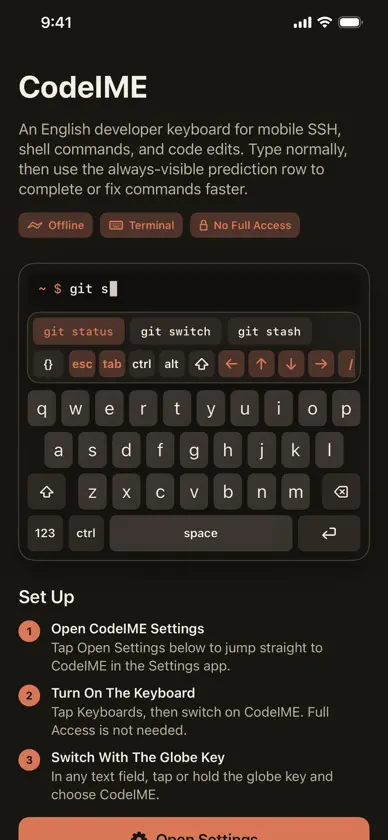
CodeIME is an iOS keyboard built for developers working from a phone. It keeps the familiar English keyboard layout, then adds fast access to terminal keys, code symbols, navigation controls, and command predictions. Use it when connecting to servers, editing files, running shell commands, or working inside terminal apps. CodeIME includes an always-visible predictive command row, quick modes for navigation and symbols, plus sticky Ctrl, Alt, and Shift modifiers for actions like Ctrl-C and Shift-Tab. Highlights: English developer keyboard with compact dark interface Terminal keys including Esc, Tab, Ctrl, Alt, Shift, arrows, slash, pipe, and tilde Sticky Ctrl, Alt, and Shift for chords such as Ctrl-C, Ctrl-D, Shift-Tab, and Ctrl-Arrow Always-visible predictive command row and code symbol panel Key pop-ups, hold-to-repeat delete and arrows, input click sounds, and modifier highlighting Privacy-friendly design with no tracking and no data collection CodeIME does not require keyboard Full Access.
What's new
Version 1.2 · Oct 31, 2026
CodeIME 1.2 learns your commands and knows what is running in your terminal. • Predictions learn the commands you run, saved only on this device. Hold a prediction to pin or forget it • The top row switches to vim, nano, less, htop, and tmux keys while those programs run • Risky commands such as rm -rf ~ or a force push turn Return red: hold it to run, or tap the safer version • Drag along the space bar to move the cursor; in terminals, drag up or down for shell history • Hold a letter for the digit or symbol in its corner, and slide to pick extras such as && or 2>&1 • Page Up and Page Down keys next to the arrows • Placeholders such as the message in git commit -m are left out, and the cursor lands where you type • Caps lock no longer turns arrow keys into Shift-arrows


