
doodloop – Draw & Loop
Yongsu Lim
No ratings yetGraphics & DesignAges 4+
Screenshots



About this app
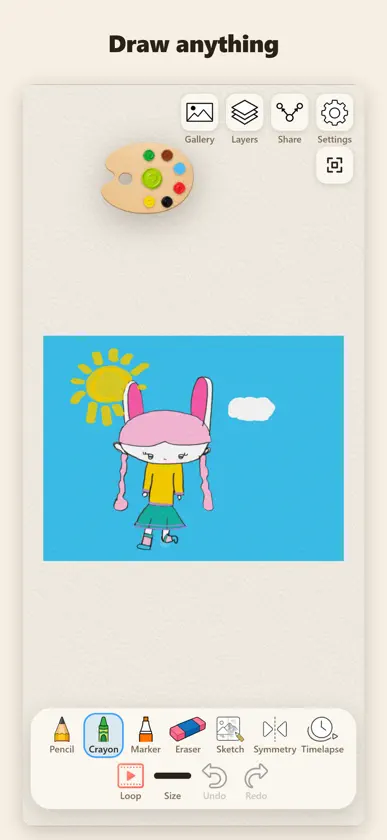
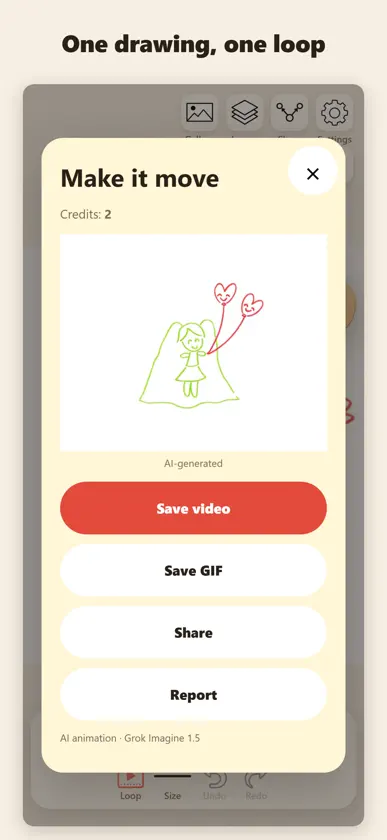
doodloop is a drawing pad for kids and grown-ups. Your lines stay yours — wobbly, naive, in the colours you picked — and then, if you want, the drawing becomes one short loop. DRAW, FOR FREE • Pencil, ink pen, marker, crayon, chalk, watercolour, spray, highlighter, neon and rainbow — real-feeling strokes with pressure and tilt on Apple Pencil, and with your finger too. • Sizes that match the tool: a pencil has three, a brush has five. • A floating paint palette: tap a well, mix shades, keep your recent colours. A colour wheel and an eyedropper when you want any colour. • Hold still at the end of a stroke and it snaps to a clean line, circle or rectangle. Turn it off in Settings if you like the wobble. • Symmetry: draw one side, the other side follows. • Photo → sketch: turn a photo into faint grey lines under your drawing and trace over it. The photo never ends up in your picture. • Timelapse: replay how the drawing was made and save it as a video. • Up to 8 layers, undo with a two-finger tap, redo with three. Everything saves by itself. A gallery keeps every drawing. • Share a clean white PNG of the drawing only — no buttons, no chrome. LOOP Tap Loop, choose 6, 10 or 15 seconds, and the drawing becomes one muted looping clip. The instructions we send always say: one clip, one shot, do not redraw, do not restyle, no 3D, no photoreal — keep every wobbly stroke. Save it as a video or a GIF. Loops use credits (6 s = 1, 10 s = 2, 15 s = 3). Credits come in packs of 3, 10 and 30. There is no subscription and nothing is unlimited. Drawing tools are always free. Purchases sit behind a grown-up gate. WHAT doodloop DOES NOT DO No account. No chat. No ads. No social feed. Drawings stay on your device unless you save or share them. When you make a loop, only the white drawing PNG and the text instructions leave the device, to generate that one clip. For iPad and iPhone.
What's new
Version 1.0.3 · Oct 20, 2026
Make a Christmas card from your drawing or its loop: pick a frame, add a greeting or your own handwriting, and save it. Loops move more naturally: Claude looks at your drawing first and picks a motion that fits it. Loops now have gentle sound — tap Sound to turn it off. Play a drawing's loop again from Gallery. Pick a length, then tap Start loop creation.
In-app purchases
The most popular purchases on the App Store.
- 30 Loop CreditsConsumableUSD 59.99
- 10 Loop CreditsConsumableUSD 19.99
- 3 Loop CreditsConsumableUSD 6.99
More from Yongsu Lim


You might also like
 DoodLoopNubisco, LDA
 Zivo DrawNanjing Heyback Technology Co., Ltd.
 House AI- AI interior DesignerSungat Satemirov
 MicapaintSHOGO SEKI
 PixelPencil - Pixel art editorYosuke Seki
 Sketch & Trace: Drawing AppShardaben Katharotiya
 Ai Motions: Animated DrawingsHexa Software
 Noodle: Animate your DoodlesCardinal Blue
 AniToon: Draw Art & AnimateKineMaster Corporation
 Naomi AnimationAniotech