
Plop Browser
Stuck in the Sand
No ratings yetUtilitiesAges 17+
Screenshots




About this app
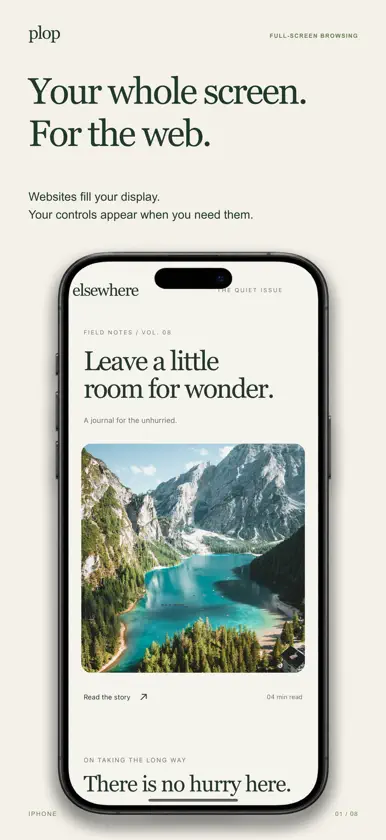
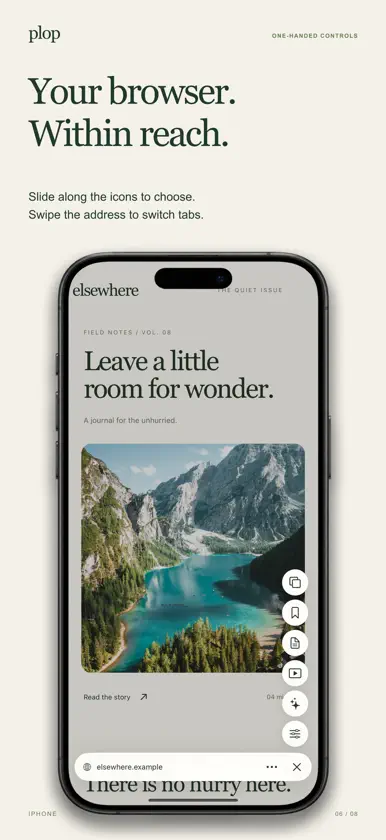
Plop lets websites fill your screen. The address bar and controls stay out of the way until you need them. WITHIN REACH Double-tap page text or empty space, or tap with two fingers. A slim address bar rises from the bottom, with icons along the side. Glide over an icon to see its name, then release to choose. Tap the address to type, slide across it to switch tabs, or flick upward to see all your tabs. Switch between Grid and Cover Flow with one tap. MADE FOR YOUR SCREEN On iPhone and iPhone Duo, eligible website buttons move around the camera or Dynamic Island while the page stays full screen. On Duo's cover display, turning sideways can open an article in Reader. Supported tent posture can start Play. iPad has its own start workspace, side panel and keyboard shortcuts. SAVE IT. FIND IT AGAIN. Saved brings bookmarks, pocketed pages and history into one searchable view. Organize links into collections. On iPad, drag a link to Pocket at the bottom edge, or to the right edge of a wide window to open another page beside it. STUMBLE INTO SOMETHING INTERESTING Tap with three fingers, shake when enabled, or choose Stumble. Find a curated website, then tap the small ring for another. Hold and slide to like, dislike, save or share. Recommendations learn from your choices on your device. Optional community learning is off by default. PLAY THE PAGE Shops become product cards with photos and prices. Music pages show artwork and track details. Forums become post cards. Articles become excerpts, images and an occasional recall question. Cards advance on their own, or swipe to move. Content depends on what the website makes available. READ COMFORTABLY Reader keeps the main article with balanced margins. Listen offline in English, start from a paragraph or selection, and tap another passage to move the voice. Other languages use installed Apple voices. Change text size from the controls. Built-in ad and tracker blocking includes per-site controls. MAKE IT YOURS Create a custom theme, choose a gradient, or roll the dice for a new palette. Save, name and share your favorites. Choose Automatic, Light or Dark for Plop. The moon/sun button beside the address switches Nightfall website colors without changing your theme. PICK UP ON ANOTHER DEVICE Turn on Sync with iCloud to bring your normal profiles, themes, supported settings, bookmarks, Pocket collections, recent history and open-tab links to your other Plop devices using the same Apple Account. Profiles keep separate website sessions. Private tabs, passwords and website sign-ins do not sync. ADD A LITTLE EXTRA Browse a small native extension catalogue with known incompatible picks hidden by default. Check a Chrome Web Store link or import a ZIP/CRX, then review its access before adding it. Extension compatibility is in beta; not every Chrome extension or feature works. Extensions stay out of private tabs. Safari App Store extensions are not supported. PAY ONCE, KEEP BROWSING Download Plop free and start a seven-day trial in the app. After the trial, a one-time purchase keeps browsing unlocked. There is no subscription or automatic charge. Customers who already paid for Plop keep access. Optional tips support development. A short welcome explains the gestures. Find help, request a feature through @plopbrowser on X, or sign up for beta and desktop updates inside the app. Some features depend on the website, device and iOS version. Plop can be selected as your default browser. Password AutoFill and passkeys use Apple’s system support on compatible devices and websites. Support: https://plopbrowser.com/support/ Privacy: https://plopbrowser.com/privacy/
What's new
Version 1.1.3 · Nov 10, 2026
Plop is now free to download. Start a seven-day trial in the app, then unlock browsing with a one-time purchase. Existing paid customers keep access. When you tap Record another, Plop returns to setup so you can adjust the camera, audio and quality before starting. Your previous video remains available. The optional watermark now includes the Plop logo. A little room to read. • Books joins your saved pages in Library. Switch between Pages and Books, resume your latest book from the start page, and return to browsing without losing your place. • Import EPUBs and PDFs into a cover-first library with Shelf, Covers and List views. • Read immersively with automatic single-page and landscape spreads, printed page turns, adjustable EPUB fonts, spacing and margins, and System, Light or Dark paper. • Highlight passages in five colors. Annotations have a distinct dotted outline and can include voice notes. • Fold a page corner to bookmark your place and find it again. • Search selected words alongside your reading and listen to books with Plop’s read-aloud engine. Webnotes puts conversations on the web: jump to annotated passages, add voice notes and threaded replies, and explore notes without losing your browsing context. Also included: • Web links stay in Plop by default, including Google Images; save images directly to Photos. • A cleaner More menu, theme-tinted navigation, tab Workspaces and download management. • Record walkthroughs with optional camera, pause/resume, demo zoom, captions and a removable watermark. • Optional weekly recaps with titles, website previews, insights and shareable videos. • Purchase recognition fixes so existing customers keep access without another unlock payment. Private tabs stay out of recaps, workspaces and public annotations. EPUB typography is adjustable; PDFs keep their original layout. Webnotes is lighter and closer: icon-only controls, inline joining and editing, restored author profiles, and a direct return to your feed. Improved book text selection and wider reading on the outer display. Latest refinements: supports iOS 18.4 and later, fixes a Duo menu-opening crash, makes the annotation editor more comfortable with the keyboard, supports whole-paragraph book annotations, and hides all page markers immediately when Webnotes is turned off. The welcome tour explains how full-screen browsing works and how to bring back the controls. On Duo, the tour adjusts its fold instructions as you rotate and waits for the phone to open before continuing.
In-app purchases
The most popular purchases on the App Store.
- 7-day TrialConsumableFree
- A little moreConsumable39,00 kr
- A coffeeConsumable29,00 kr
- A small thank youConsumable9,00 kr
- Keep PlopConsumable29,00 kr
More from Stuck in the Sand


You might also like
All apps like Plop Browser → Bmote - BLE camera remoteMohammad Abu-Garbeyyeh
 Aeon ViaAlex Fife
 Wide Web: Full Screen SafariZooKeeper Media LLC
 Coffee Bags: Beans CollectionTommaso Ferrari
 Brim BrowserJoao Pozzobon
 ClickletNicholas Ritschel
 Fruitstand: Device CollectionArmand Sarkani
 WristmateMinorbits LLC
 Sidefill: Wide View for SafariSeokyong Kim
 OutSpan - Fullscreen BrowsingYaw Boamah