
Sheetforge
ehsan azish
No ratings yetProductivityAges 4+
Screenshots



About this app
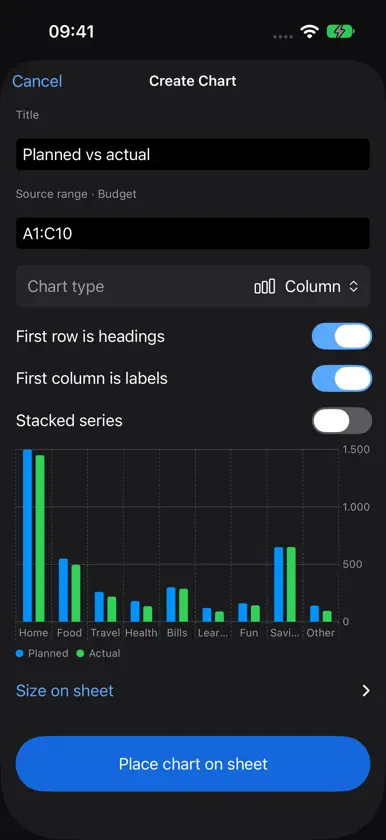
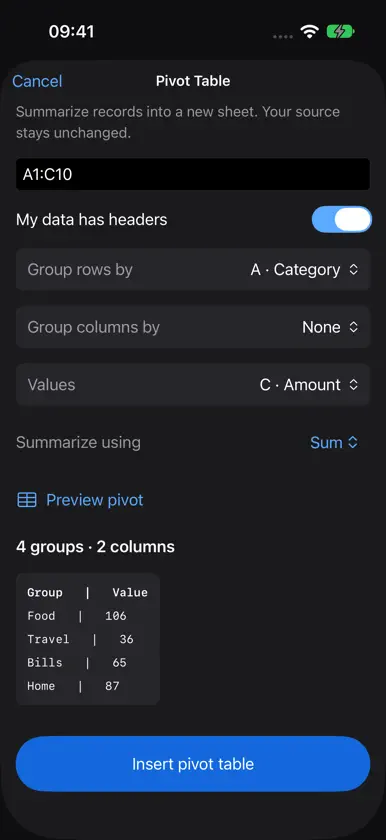
Make sense of your numbers, wherever you are. Sheetforge is a spreadsheet app for everyday life and work on iPhone and iPad. Plan a household budget, keep track of expenses, organize stock, compare costs or turn a table of numbers into a clear chart. Start with a blank workbook, choose a ready-made template or open a spreadsheet you already have. All features are free. There is no subscription, no in-app purchase and no account to create. START WITH SOMETHING USEFUL Create a Monthly Budget or Inventory workbook and make it your own. Work with multiple sheets, return to recent projects and keep your spreadsheets saved on your device. Open supported Excel workbooks, CSV files and Sheetforge projects from Files. EDIT COMFORTABLY ON ANY SCREEN Tap to select a cell, double-tap to edit and drag to select a range. Enter values or formulas, find an entry and use Undo when you change your mind. On iPad and a fully opened iPhone Duo, the larger workspace gives you room for your sheet, tools and inspector. Show or hide panels to give your data more space. LET THE NUMBERS DO THE WORK Use familiar formulas such as SUM, AVERAGE and IF, along with a broad range of math, lookup, text and date functions. Suggestions help you find a function, and totals update when the source values change. Refer to other sheets, name important ranges and extend supported patterns with Smart Fill. MAKE YOUR SHEETS EASIER TO READ Choose bold, italic, text and fill colors, borders, alignment and wrapping. Display values as currency, percentages and other number formats, and choose decimal precision. Freeze rows or columns to keep your place while moving around a larger sheet. FIND THE STORY IN YOUR DATA Sort by multiple columns, filter the entries you want to see and summarize a table with a pivot table. Build column, bar, line, area or pie charts, then place, move and resize them on your sheet. Edit the source data and your chart updates with it. OPTIONAL HELP WITH FORMULAS On compatible devices with Apple Intelligence enabled and its on-device model available, Ask AI can suggest a formula, explain an existing one, help diagnose an error or summarize a selected range. Review suggestions before applying them. Availability depends on your device, software, language and region. The spreadsheet tools work without Apple Intelligence. SAVE AND SHARE IN THE FORMAT YOU NEED Keep an editable Sheetforge project, export an Excel workbook, save the current sheet as CSV or create a PDF. Choose Files, the system share sheet or Print for PDF. See the prepared file size before exporting. Excel exchange supports common values, formulas and formatting. Macros, embedded images, imported charts and some advanced Excel features are not supported. Excel exports omit charts and keep pivot results as cells; use Sheetforge format to preserve editable project features. CSV keeps values rather than formatting, and PDF is a printable snapshot. Non-native exports include filtered-out source rows, as explained in the export sheet. YOUR FILES, YOUR CHOICE Core editing and calculations work offline. No advertising, tracking or analytics are built into the app, and no developer server receives your spreadsheets. You choose which files to open and where to save or share them, including any storage provider you use through Files. Privacy Policy: https://3nsofts.com/sheetforge/privacy Terms of Use: https://3nsofts.com/sheetforge/terms


